 Rhythme testers
Your cosy run-through
Twenty calm minutes through the whole app, in order. Tick each step as you go, and send us anything that looks off.
A cosy diary for your cycle and wellbeing
Rhythme is for women at every life stage. You live in a little dream room with Rhea: log your period, sleep, food and moods by tapping things around you or telling Luna, take short mindful breaks with Erin, and look after a garden, a farm and pets along the way.
It is a diary, not a diagnosis.
A few quick things
Thirteen stops, in this order
Each card says what to do and what should happen. If what happens is different, that is a bug worth sending.
-
Getting to know you2 min · first open

Do: Answer the welcome questions. Already did them? You, Getting to know you.
Expect: Only questions that fit your life stage. Next stays off until each one is answered, then you land in your room.
chevron_rightTry this too
- Change one answer later and see the app follow it.
- Try a life stage that is not yours on a second run, to see its questions.
-
Your room2 min

Do: Tap things in the room. Tap the floor to walk. Tap the wardrobe and pick an outfit.
Expect: She walks with real steps (no gliding), twirls into the outfit, and each thing opens its own card.
chevron_rightTry this too
- Tap yourself for your menu.
- Walk up and down the stairs in a two-storey home.
- Check the room at night: it should dim, not break.
-
Tell Luna2 min · the moon at the bottom

Do: Tap the moon and write like a text: cramps, pain 4, slept 11pm to 7am. Then tap a tile under Today’s check-in.
Expect: Cards titled Here is what I understood. Save ticked keeps them, and the check-in tile ticks itself.
chevron_rightTry this too
- Untick one card before saving: only ticked ones should save.
- Ask a question, like how do I know my cycle phase?
-
Snap a meal1 min

Do: Food, Add a meal, Snap a photo. Use a real plate or a photo of one.
Expect: Luna names the dish and you check it before anything saves.
chevron_rightIf it says photos are off
- Turn on You, Luna’s settings, Recognise food photos, then try again.
- Also try Scan barcode on a packet.
-
Cycle and calendar2 min · Cycle tab

Do: Open Cycle, then Log or fix a past day. Mark a few days.
Expect: Your days show on the calendar and the rings fill in as entries grow. Nothing claims a diagnosis.
chevron_rightTry this too
- Fix a day you got wrong.
- Tap the small i next to a score and read why.
-
Food diary2 min · Food tab

Do: Add a meal by search. Open Today and log a glass of water. Open Ideas.
Expect: The meal shows in Today with its numbers, water counts up, and Ideas lists foods to try and recipes.
-
A few minutes with Erin3 min · Mind tab

Do: Mind, With Erin, 3 min. Sound on.
Expect: She sits on her mat, Erin’s voice guides you, and Stop ends it cleanly.
chevron_rightTry this too
- Koi Pond or the Light Flower for breathing.
- Lock the phone halfway, come back, and see if it recovers.
-
The garden1 min · walk out the door

Do: Walk outside. Sit on a bench, peek into the greenhouse.
Expect: A new place lights up on the map once you have walked there.
-
The farm2 min


Do: Tap a hen or a cow. Use its care bubble: pet, feed, brush, give it a name. Water a bed.
Expect: The bubble acts at once, the animal shows a gentle mood, and its name sticks.
chevron_rightTry this too
- Go inside the hen house and the barn.
- Check the ranch counter after buying an animal.
-
The plaza2 min · groups and chat

Do: Open Plaza groups, pick a door, read the room notes, and say a short hello.
Expect: Your message may wait for a person before others see it. Links and phone numbers are refused.
chevron_rightPlease keep it kind
- Everyone here is testing too. Nothing about real patients or other people’s health.
-
Harbour and Dream Street2 min · tap your hearts

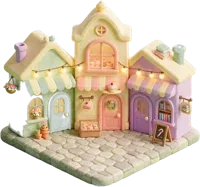
Do: Tap the hearts chip at the top for Dream Street. Try on a dress, visit the grocer and pet shop. Stroll the harbour.
Expect: Try-on does not save until you buy. Shops keep your place when you buy something.
-
Furnish your home2 min · Inventory

Do: Open the Inventory tab under your room. Swap a bed or a sofa. Buy one more at the furniture shop.
Expect: The piece sits in its spot (never floating on a wall) and says which home it is for.
chevron_rightTry this too
- Visit the family home or the bath house and swap a piece there.
-
Journal and doctor’s PDF1 min · top bar icons

Do: Tap the book icon for My journal and look through its tabs. Tap the medical bag, then Download PDF.
Expect: Today’s logs are in the journal. The PDF opens with your cycles and logs, made on your phone.
Tell us from inside the app
Every report reaches the team with the page you were on.

The bug icon sits at the top right of your room, just under the cycle day chip. You need to be signed in to see it.
- photo_cameraTake a screenshot first, if it helps.
- bug_reportTap the bug icon and write what went wrong.
- imageTap Add a screenshot and pick it from your photos.
- sendSend. You get a short code back. The page and phone details go along by themselves.
I did: tapped the hen, then Brush
I expected: a brushing moment for the hen
Instead: it talked about Clover the cow
task_altWhen we fix it, a Fixed card with this ladybug appears in your room. Tap Try it now to check.
Little tips
If you spot these, test them too
Thank you for helping Rhythme grow.